
Web Application Firewall on Zadara zCompute
- 8 de set. de 2025
- 5 min de leitura

Written by Osmar R Leão
SA @Zadara
The Zadara compute stack is flexible and permits creativity and talent to create new solutions that are not necessarily ready from the cloud orchestrator. This article is my latest contribution to Zadara’s zCompute portfolio of solutions: Web Application Firewall.
One Web Application Firewall is an additional layer of defense against web attacks based on HTTP requests. It is a security system that sits in front of a web application to inspect, filter, and block malicious traffic. It acts as an intermediary between the internet and your website or web application, examining HTTP requests and responses for potential threats.
This article demonstrates a completely isolated web server inside a private subnet. The WAF will stay in front of a load balancer and the servers will be behind all of these:

The creation of VPC with its subnets will not be shown, but the diagram above is self-explanatory. For this demonstration proposal, only 2 web servers were deployed, one load balance, and the WAF.
Starting from the web server installed: Linux with Apache, PHP, and a simple script to show the hostname when one request is made:

Two of these web servers were deployed. The next step was to create a load balancer in a new isolated private subnet:

The load balancer must be an Application Load Balancer (ALB) to work inside a private subnet with the target group in another private subnet.
The next step is to create a target group pointing to the web servers:


Then, inside the load balancer created, add a new listener pointing to this target group:

Do not forget to put the right HTTP port:

The result is shown below:

The web access test:

Now the fun part of the story: Web Application Firewall installation.
Web Application Firewall
The solution I chose to create the WAF was SafeLine (https://waf.chaitin.com/). SafeLine is stable and it is also a simple solution. To more about SafeLine, consult this link: https://docs.waf.chaitin.com/
The first step is to create an instance with two network interfaces: one attached to the public subnet, and the other on the same subnet of the load balancer. Choose one Linux image compatible with the docker-ce package according to the SafeLine manual.
Attach one Elastic IP to the public interface of the instance, the result must be like this:

NOTE: I will create a public image of this WAF solution to be used by Zadara MSP.
Run the installation script on your Linux instance:
[root@web-application-firewall ~]# bash -c "$(curl -fsSLk https://waf.chaitin.com/release/latest/manager.sh)" -- --en
  ______               ___           _____       _                        ____      ____       _        ________
.' ____ \            .' ..]         |_   _|     (_)                      |_  _|    |_  _|     / \      |_   __  |
| (___ \_|  ,--.    _| |_    .---.    | |       __    _ .--.    .---.      \ \  /\  / /      / _ \       | |_ \_|
 _.____`.  `'_\ :  '-| |-'  / /__\\   | |   _  [  |  [ `.-. |  / /__\\      \ \/  \/ /      / ___ \      |  _|
| \____) | // | |,   | |    | \__.,  _| |__/ |  | |   | | | |  | \__.,       \  /\  /     _/ /   \ \_   _| |_
 \______.' \'-;__/  [___]    '.__.' |________| [___] [___||__]  '.__.'        \/  \/     |____| |____| |_____|

[INFO  11:25:28]: SafeLine is a self-hosted WAF(Web Application Firewall) to protect your web apps from attacks and exploits.
[INFO  11:25:28]: A web application firewall helps protect web apps by filtering and monitoring HTTP traffic between a web application and the Internet. It typically protects web apps from attacks such as SQL injection, XSS, code injection, os command injection, CRLF injection, ldap injection, xpath injection, RCE, XXE, SSRF, path traversal, backdoor, bruteforce, http-flood, bot abused, among others.

Choice what do you want to do  [ 1.INSTALL  2.UPGRADE  3.UNINSTALL  4.REPAIR  5.RESTART ]  (1/2/3/4/5): 1
[INFO  11:25:32]: Will be going to installing SafeLine WAF for you.
[INFO  11:25:32]: Checking docker version
[INFO  11:25:32]: Checking docker compose version
[INFO  11:25:32]: Installation environment check passed
Input the path to install SafeLine WAF  (Keep blank default to /data/safeline):
[INFO  11:25:34]: Disk capacity of "/data/safeline" has 13.65 GB avaiable
[INFO  11:25:34]: Downloading the docker-compose.yaml file
[INFO  11:25:35]: Updating .env configuration files
[INFO  11:25:41]: Getting SafeLine WAF latest version
[INFO  11:25:42]: target version: 7.6.2
[INFO  11:25:42]: Pulling Docker image
[+] Pulling 70/70
 ✔ fvm Pulled                                                                                                                                                                                           40.5s
 ✔ postgres Pulled                                                                                                                                                                                      41.7s
 ✔ tengine Pulled                                                                                                                                                                                       41.0s
 ✔ detect Pulled                                                                                                                                                                                        33.9s
 ✔ mgt Pulled                                                                                                                                                                                           42.6s
 ✔ luigi Pulled                                                                                                                                                                                         30.4s
 ✔ chaos Pulled                                                                                                                                                                                         41.0s


[INFO  11:26:25]: Starting Docker containers
[INFO  11:26:34]: SafeLine WAF installation completed
[INFO  11:26:34]: Wait for mgt healthy
[INFO  11:26:39]: Wait for mgt healthy
[INFO  11:26:44]: Wait for mgt healthy
[INFO  11:26:49]: Wait for mgt healthy
[INFO  11:26:54]: Wait for mgt healthy
[INFO  11:26:59]: Wait for mgt healthy
[INFO  11:27:04]: Wait for mgt healthy
[INFO  11:27:09]: Setup admin
[INFO  11:27:13]:
[INFO] Initial username:admin
[INFO] Initial password:NwG2ObgI
[INFO] Done
[INFO  11:27:13]: SafeLine WAF management panel: https://10.0.0.13:9443/
[INFO  11:27:13]: SafeLine WAF management panel: https://0.0.0.0:9443/

https://discord.gg/SVnZGzHFvn

Join discord group for more informations of SafeLine by above address
Then open the management panel using your EIP:

After the login, the dashboard is your main page:

On the Applications tab is possible to create a new website to be protected:

Make sure your application FQDN points to your WAF, this must be filled in on the “Domain” field. For demo proposes, only the EIP address was deployed:

One SSL Certificate (HTTPS) is needed to work. In this demo, the SSL part of the configuration was excluded.
Click on submit and your first protected website will be running behind the SafeLine WAF:
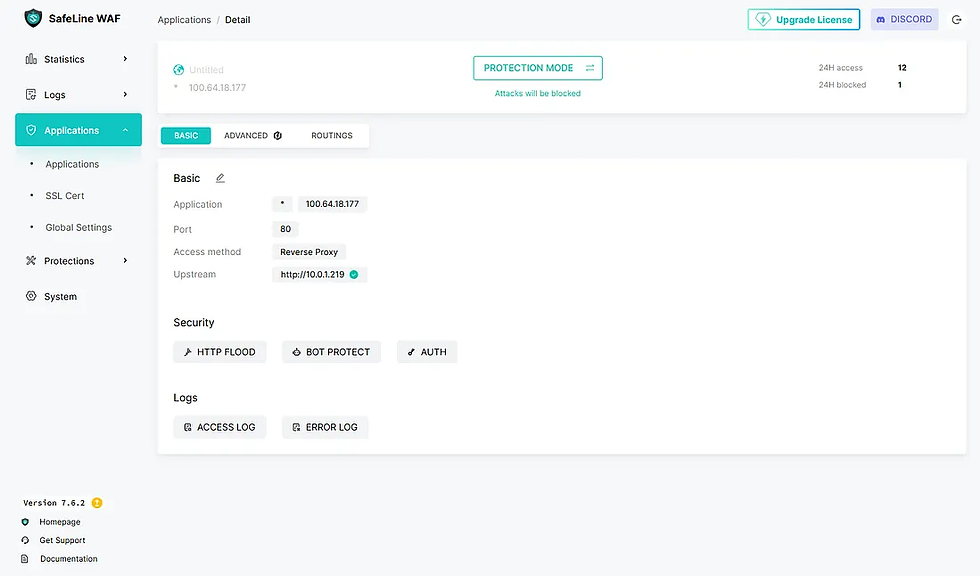
It is possible to create thousands of http routings, and protection rules. This is not this article’s goal. But, some attacks are documented by SafeLine and were tested to hist demo:
The first attack was a code injection attempt (http://100.64.18.177/?id=phpinfo();system('id')):

Into the WAF logs is possible to see and track all the attacks and attackers to the protected website:

And our attack detail information:

Conclusion
Zadara zCompute’s flexibility enables creative cloud solutions, as demonstrated in this article.
It’s worth noting that SafeLine WAF can be replaced with any other WAF solution — the options are completely open.

Comentários